My, not so great, experience with Aidoo Pro
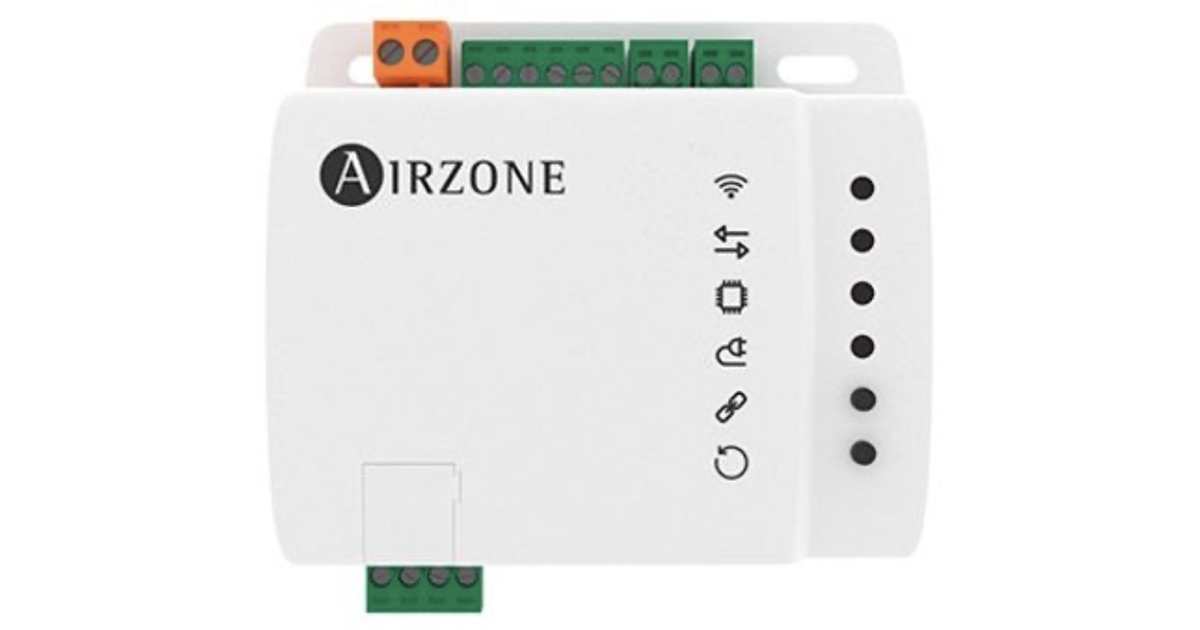
Since the first publication, I have found that some of the information presented is incorrect. I have updated this document to reflect that, but my recommendation has not changed.
I recently (late 2024) installed Aidoo Pro (model AZAI6WSPMEL, $245 at Amazon) with a MEL SVZ-KP36NA air handler (ducted downflow) and an outdoor unit. The idea was to allow control through the Ecobee (cloud control benefits) but have proper modulating behavior for the unit. The Kumo cloud offering by Mitsubishi is quite a bit more expensive and is frequently described as “it sucks.” About three to four weeks later, I removed the unit, and I am now operating using the Ecobee connected to PAC-US445CN-1 (Thermostat Interface V2). I did so because of several problems, some of which are described below.
Summary:
- North American support is unhelpful and unwilling to escalate to more capable people (engineering people, assuming they are competent and motivated).
- Initial problem: The unit would always run (heating) until the temperature was about 3F above the setpoint and maintain it there. We desire nighttime temperatures as low as 61F, but Aidoo will not accept anything below 63F
- Combined with the 3F “excursion,” our effective minimum temperature is 66F: Unacceptable.
- I diagnosed the problem (described) below. NA support does not care… It looks like my diagnosis is not quite correct, but either way, they do not care to solve this 3F excursion issue with me…
- Aidoo has unstable WiFi connection behavior and frequently does not recover after a temporary Internet/WiFi outage. This causes the system to go to “Off” mode, which is Unacceptable. * Aidoo also “controls” Ecobee (through a cloud connection). This happens not from the Aidoo unit but directly from Airzone servers.
How this setup works
Aidoo connects via a serial connection using the Mitsubishi-standard CN105 connector to a receptacle inside the air handler. This is the same as the TI2 interface. Aidoo has to obtain a setpoint and a current temperature. In the case of working with an Ecobee (and I think it is the same for Nest), it does so by linking your cloud Ecobee account and retrieving current settings from there (there is a noticeable lag, sometimes up to a minute or two for Aidoo to react to changes made on the Ecobee).
Using the serial protocol, partially documented by some who reverse-engineered it, setpoint and current temperature are frequently sent to the inside unit. This unit then decides what to do with them, including switching the compressor on and off, modulating its capacity as deemed necessary/optimal, and controlling the fan in the air handler (three possible speeds).
What if, for some reason, the WiFi or Internet is not available? Do you lose all HVAC control functions? Yes or no. Nothing through Airzone Cloud will work, or can work, because the Aidoo Pro cannot reach the cloud. The mobile app does not communicate with the Aidoo Pro over the local network (in my opinion, it should, but that is another story). However, it is possible to hook the thermostat wiring to the Aidoo Pro unit. If connected, those wires from the traditional 24V dumb thermostat model will be observed for heat/cool demand signals.
It should be noted that the available wiring options are limited: Y2 and W2 (stage 2 heating and cooling), and G1, G2, and G3 (fan speed). O/B signals are not supported (there are no terminals for them, unlike on the TI2). However, the loss of connectivity appears to first put the Aidoo into a “Disconnected” mode, with the side effect that it assumes a 63F setpoint. This is meaningless during fallback operations (“dumb wires”), but that is the setpoint communicated to the indoor unit on heat demand. In other words, this emergency fallback will maintain a 63F temperature as long as the W1 wire is energized.
Effectively, the Aidoo unit tries to act like a “communicating” thermostat, which is what the native Mitsubishi thermostats are, minus the control functions for settings.
While the Aidoo takes cues from the Ecobee, you can also manipulate settings through their AirzoneCloud app (mobile or web). If you do, changes made are forced onto the Ecobee. Most of the time, when you intentionally make changes, this is what should happen.
The Aidoo has set point modes: Comfort (68F), Eco (66F), Unoccupied (63F), and Vacation (50F; default setpoints in parentheses). I have never figured out how to select these. Mine was always in “Comfort.” I suspect you can use an Airzone thermostat to do it. As an aside, for comfort mode, the documented limits are 59-86°F in heating mode and 64-86°F in cooling mode.
Below, I only discuss heating, but I observed the same effects (in reverse) in cooling mode.
Installation
The installation instructions were on a single large sheet of paper with instructions in several languages. Native speakers did not write them, and the illustrations were (too) small and hard to read. The instructions for hooking up the required (but supplied) transformer could have been clearer. Initially, we thought it would draw power from the C and R wires already coming from the unit (for a TI2 installed first, but briefly). Not so. The custom transformer is required. It needs to be clarified why it did not have a power plug, but ultimately, we connected this to the 240V supply inside the unit.
Also, the instructions mentioned configuring the existing thermostat in “follower” mode. What if one does not have a thermostat? Is that going to be a problem? This was my first tech support email. It took 1.5 days, but I learned I could ignore it (although perhaps not; see the settings issue reported below).
It was possible to figure this out with some knowledge of electronics. However, the instructions need to be clearer for a typical homeowner to install it successfully. Of course, you can hire a professional, but that would easily double the cost. Better instructions should have made this almost trivial.
Temperature excursion
My analysis below is likely wrong because someone pointed out to me that the setting 24 correction is 4C or 7.2F (and not 4F), which causes this analysis to fail.
This turns out (99% sure) due to a setting inside the HVAC unit. This unit has a temperature sensor near the return air inlet. This return air might be warmer than experienced at about 5ft above the ground in downflow or horizontal installations in an attic. If this temperature were used to control things, the unit would believe it reached the setpoint too early (because hot air rises), and it might shut down while the temperature at 5 ft is still 2-3 degrees lower. To compensate, the unit has a function setting (24) to add a 4F compensation factor. The internal algorithm also has a 0.9F (0.5 °C) temperature differential. The net correction is 3.1F, which is precisely what I observed. I communicated this to Airzone. They don’t care.
A workaround would be to use a Mitsubishi thermostat to change that setting (Aidoo does not give the user control over any settings like the thermostats do). The thermostats are $300+ and would be used only once, so effectively, that is not an option (unless you want to cheat Amazon, order one, use it, send it back for a refund). Mitsubishi’s TI2 Interface documents that this setting is not available on that unit, which makes sense since the thermostat would “grab” the temperature at the desired height, and thus heat demand signals would be based on that temperature. I can confirm that with the TI2 hooked up, the excursions do not happen!
Possible solution(s) to the excursion problem
The simplest solution would be to change the firmware to force setting #24 off. After all, using a “real” thermostat rather than the return-air sensor would imply it should be off. Perhaps a better solution is to allow users to control that setting through Airtools. The ultimate solution would be to enable the control of all function/mode settings, but that may be asking too much.
I have gathered gear for an ESPHome setup that can be plugged into the CN105 connector (instead of Aidoo or TI2). I am primarily interested in seeing if I can use that to change the setting and perhaps try Aidoo again. It depends on my experience with the TI2.
Temperature limitation
Aside from the excursion problem, one might desire to set the heating setpoint to 55F during a multi-day absence. This is impossible as the Airzone Cloud app (mobile or web) forces any setting below 63F back up to 63F. When asked why, support said they are “Mitsubishi approved,” and Mitsubishi told them this should be the limit.
On its face, this sounds ridiculous. Imagine you have a house in a cold climate where you would have to worry about pipes freezing. You are going away for a month. You do not want to waste energy, but you also do not want frost damage. It would be entirely sufficient to maintain a temperature of 50F, but… You can’t because Aidoo won’t let you. The alternative is to switch the system off, which will eventually let the pipes freeze.
Or… you can activate vacation mode (must be through the Airzone cloud). The Airzone manual quotes:
Vacation. This mode aims for long periods of absence. It turns off all the zones to save energy and turns them on, avoiding the temperature to surpass the established limit temperature (35 ºC (95 ºF) in cooling mode and 10 ºC (50 ºF) in heating mode), generating demand with the previous set point temperature before activating the vacation mode.
Hmm… Technically, the unit can maintain 50F. So, Airzone, what gives? Even though my unit was in comfort mode and its documented default setpoint range is 59-86F, it won’t let me set it to 61F. The unit is capable of 50F and up (also reported in Mitsubishi literature). This makes sense because why would a heater care only to be activated above a specific inside temperature (not to be confused with the effective operating temperature range for the outside compressor)?
I also have reports from Kumo Cloud users that they can set their setpoints as low as 50F.
The solution would be almost trivial. As per Mitsubishi specs, change the constant (in the firmware and cloud) of 63F to 50F. Or rather, not (just) in the firmware, but in the Cloud servers (see: “Who is in charge”).
By the way, I have found that Airzone offers at least two thermostats listed on MyLink as compatible products. These thermostats have the 63F limitation documented, as do similar MEL thermostats. My current thinking is that when using an Aidoo Pro, they implement those same limits, not because the internal unit is documented to have those limits.
Who is in charge?
Whenever multiple control units are present, the question is: Who is in charge? If the setup uses an Ecobee or Nest, the user primarily wants to interact with those. If the user never interacts with the Airzone Cloud controls, I contend that Airzone should never force any behavior on the Ecobee.
That includes remembering the last known Ecobee mode applied during a period of known connectivity.
It is not the actual Aidoo Pro device; it is their cloud servers that control the Ecobee, even if the Aidoo Pro is not connected to the cloud. I believe this because something unexpected happened after I disconnected the wires from the Aidoo (including its power source) and connected them to the TI2. When I made the change, the Ecobee was set to 71F or something like that. The TI2 took over, and things operated as expected until my “Sleep” schedule kicked in when I had set the temperature to 61F because I could now! Lo and behold: about a minute or two after (did I mention lag before?) that schedule change, the Ecobee was forced back to that now infamous 63F. I had not thought about disconnecting the Aidoo from my Ecobee account. After I did that, this behavior stopped…
Aside from the above, this approach can make various Ecobee functions on the display confusing. For example, Ecobee will try to energize the W1 wire when it decides the temperature has gone below the setpoint by a specific differential (configured at 1F in my case). It will indicate this by showing a “heat” symbol and an orange (flame color) ring around the perimeter of the display. However, Aidoo does not “listen” to these wire signals when properly connected to WiFi (they are only used in fallback mode). It will not activate the unit’s heat demand (it can know the current setpoint and temperature, the differential, and then “fake” the current temperature low enough to trigger activation; this is essentially what TI2 does). When Aidoo sees an updated (lower) temperature from Ecobee (via the cloud and associated lag), it communicates it to the unit. Then the unit decides whether to act on it.
Meanwhile, the orange ring is on. If you use Beestat, the graph showing when the heating is active, and the corresponding calculations of resistance and balance point, will be entirely incorrect. The thermostat status display suffers the same problem(s) as the built-in display.
Connectivity issues
As it happened, right around the time the Aidoo was installed, I also changed my WiFi setup. That setup had some issues (now resolved) that probably exacerbated the connectivity issues with the Aidoo. Still, I am glad because it allowed me to identify problematic behavior before it became a problem.
Even after the WiFi issues were resolved, connectivity issues persisted. My WiFi offers 2.4 GHz and 5 GHz connectivity, with the former having better range/signal through walls, etc. Both are offered in a mesh network with identical SSIDs and passwords. My Aidoo is in an HVAC closet about 5 feet from a WiFi access point, but there is a wall and a wooden door between them. There is another identical access point about 15 feet away, in a 90-degree different direction, with three walls in between. Aidoo supports both frequencies. It consistently connected to the further-away unit on 5 GHz rather than the nearby one. This may have made sense, assuming the wall penetration to the nearby unit was the cause. The connection signal strength was listed as “weak” by my WiFi unit. I then changed the configuration to force the Aidoo to the 2.4 GHz band, and it connected to the nearby unit. Signal strength was now “excellent.” Connectivity issues did not disappear, but were much less. I conclude that Aidoo prefers 5 GHz over 2.4 GHz, regardless of signal strength. If the device relied on high-bandwidth communication with the cloud, that might make some (minor) sense. Still, it is not communicating much or frequently (remember me mentioning lag?) The lag is noticeable: Ecobee changes take 1-2 minutes to appear in the Airzone Cloud, but changes in the Airzone Cloud can take multiple minutes to take hold on Ecobee. While it can be debated whether more rapid, frequent updates are warranted, this indicates low bandwidth requirements.
The worst is that after connectivity comes back, assuming Aidoo reconnects (which is somewhat frequent and will only do with intervention), it remembers this 63F and forces it onto the Ecobee. It is doing this through the Ecobee cloud, and it causes the Ecobee thermostat to adopt that checkpoint even if the Ecobee was online all this time or reconnected well before the Aidoo and the user set something else. BAM! It just overrides. So, if you are not constantly watching, your house will cool to 63F, and stay there. If this happens on a cold day, right after you leave work, and you don’t notice, you’ll return to a 63F house unless your Ecobee schedule demands something else before you come home (and the hold setting is “until the next scheduled event”). At the very least, it can be a lot of wasted energy.
Other issues
Just an abbreviated list:
- My house/site name was 80% of the time mangled in both the mobile and the web app (the mobile app is a thin shell around the web app, with a bit of extra functionality related to configuration: Air Tools). The mangle version seemed to consist of transposing every two characters in the name. This is a classic big-endian vs. little-endian encoding issue, indicating that communication between the server and the web application is in binary format and that there is no agreement/compensation for byte-order differences. I pointed this out to them, but in over 4 weeks, this simple issue (which would be a server-side-only fix) was never addressed.
- A new feature called “tariffs” was introduced. Never mind what we call “rates.” It involved displaying the price/rate and cumulative cost. My rate of $0.45 (can you believe it?) was shown as 0,45000 $/kWh. Of course, over here, respecting the browser locale, that should have been using a decimal point rather than the comma (as is standard in Spain, where Airzone is located), but also using four decimals behind the period/comma makes no sense whatsoever. I pointed this out as well. It was never fixed.
- When the unit was disconnected, the app did not allow it to be rebooted. This might seem logical given the cloud dependency, but the Air Tools portion can still work over Bluetooth. The app does not offer an option to force the unit to reconnect to WiFi, or to do so via a “reboot” or “restart” button. Luckily for me, there is an actual restart button on the unit, but unless your unit is easily accessible…
- Behavior graphs on the Airzone cloud show when heating or cooling is active as different colored bands. These bands always corresponded precisely to the crossing point of the temperature at the setpoint, or in reverse (when a schedule raised the setpoint to a value above the current temperature). The serial connection protocol lets Aidoo know when the compressor and/or fan is operating (at least, I believe it is possible to detect that). Using that information to determine the bands’ location is the only correct way. As it stands, the information, along with a daily summary of what happened in the various bands, is misleading at best but more like “useless.” If it is truly not possible to determine the unit’s status, then they should not even display these bands and information.
Customer support
I have told Airzone support about all this, including documentation with graphs of observed behaviors, calibration with other thermometers, etc. They have not even looked at it. Their final answer was to tell me to return the unit. I even specifically explained that I am an engineer and happy to work with their engineers because the product has potential.
Considering this, I cannot recommend the Aidoo Pro (or any version) for a ducted installation. Using them with mini-splits may work better, since they are typically mounted high and may not have that specific compensation setting.
Airzone support works via email or phone (I only tried calling once, and it did not work for me, primarily due to the support person’s poor English and difficulty understanding me). After a few emails, I was admonished that I should not be sending them emails except as replies to my very first one. They do not have a support ticketing system to track interactions and issues. They locate history by looking for that one email thread with my name on it. Of course, that also implies a massive thread with emails getting ever larger due to the inclusion of what one is replying to. That may be the explanation, but not an excuse, for never appearing to understand what was already said in prior emails and not even reading the whole of the current email: ask six questions and get only one answered. Either they don’t read well, or they selectively only answer what they want to answer.
I was initially excited to find this solution, as it promised something much better than Kumo Cloud, IoT-style cloud connectivity, and the ability to use an Ecobee with remote sensors in various rooms. Based on the above, I cannot recommend it. The TI2 solution is slightly cheaper and, so far, does not seem to suffer from the same problems. The jury is still out on how well the compressor modulation performs in terms of energy efficiency.